Labo Construction Truck : Kids
- 4.1
- Rating
- 10.00M
- Installs
- Free
- Price
 Analysis by App-foxy
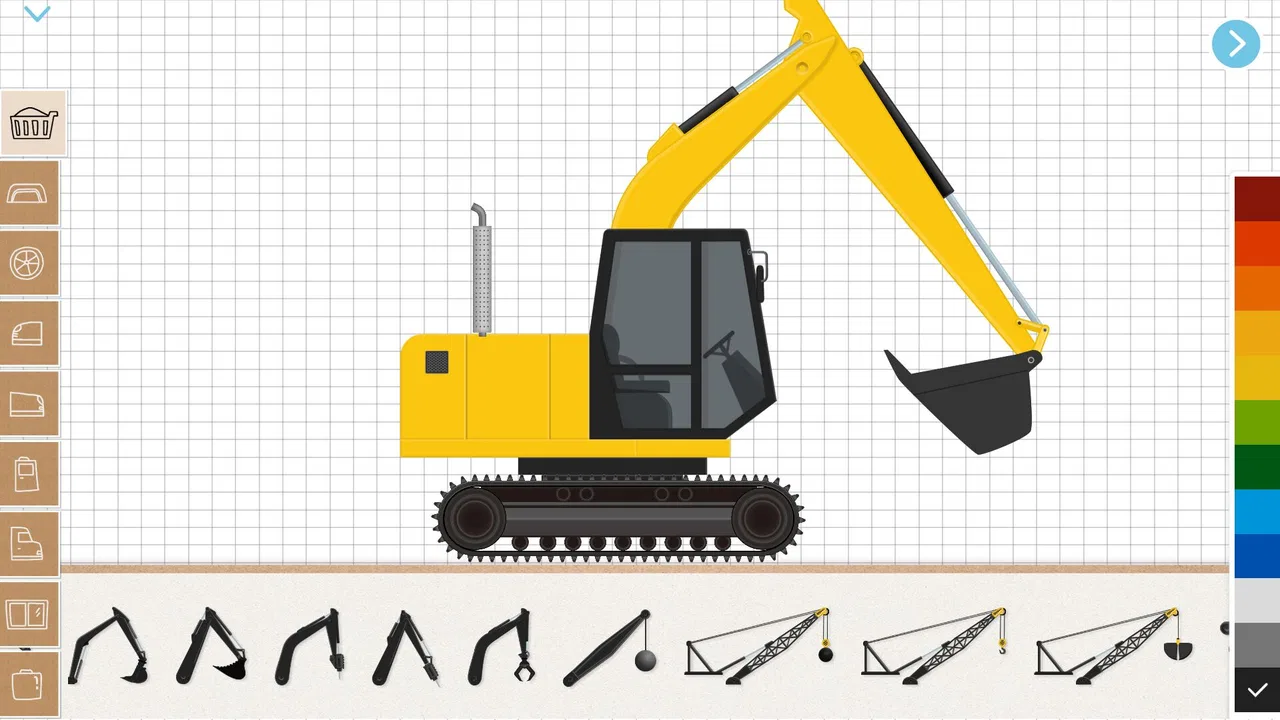
When I first tried Labo Construction Truck: Kids, I immediately understood its main appeal: it turns construction vehicles into something children can assemble and play with, rather than presenting them as finished toys to tap through. That small difference changes the experience. The child is not only watching a bulldozer move or selecting a truck from a menu; the building step becomes part of the game.
This is an educational game from Labo Lado Co., Ltd. aimed at young children who are fascinated by cranes, forklifts, concrete mixers, bulldozers, and other machines found on a building site. It is free to start, suitable for Everyone, and available on devices running Android 6.0 or later. I see it as a gentle introduction to construction-themed play, especially for children who enjoy putting things together but may not yet be ready for a complex building simulator.
The central idea sounds simple, but it has a useful effect: the child gets to create the vehicle before using it. That gives the play session a natural rhythm. There is a moment of choice, a hands-on assembly stage, and then a chance to see the finished machine in action. In my experience, that sequence is more engaging than a game that begins with every vehicle already unlocked and ready to drive.
You May Also Like

 Blood Strike: 2.5 Anniversary
Blood Strike’s Loadouts Turn Every Drop Into a Tactical Gamble
A close look at Blood Strike’s custom loadouts: how fast access to signature weapons reshapes its battle royale rhythm, rewards preparation, and narrows the gap between fights.

 Pandora - Music & Podcasts
Pandora’s Music Is Easy to Start, but Harder to Recover
Pandora’s strength is its low-effort path from a seed to a station. Its weak spot is how much confidence it asks you to place in connection, setup, and quiet recovery.

 8 Ball Pool
 Is Built on Rivalries, Rematches, and Routine
A close look at the rivalries, rematches, shared routines, and unanswered safety questions that turn a quick pool match into a persistent mobile community.

 Samsung Music
’s Quiet Strength Is Playing What You Already Own
Its reach comes less from spectacle than from dependable access to a personal library. That simplicity is both the app’s strongest retention engine and its ceiling.

 AccuWeather: Weather Radar
AccuWeather Review: A Quick, Clear Forecast for Everyday Decisions
For everyday plans, the best forecast is the one you can understand quickly. AccuWeather makes rain timing, radar, and local conditions easy to act on, with a few trade-offs.

 Hill Climb Racing
Why Hill Climb Racing Still Turns Crashes Into One More Run
A tiny car, a bumpy hill and one more upgrade: Hill Climb Racing keeps resurfacing because its simple chaos makes every near-miss feel personal.
More From Our News Desk



Building the machine is the real heart of the game
The construction theme is not just decoration around an ordinary driving game. The vehicles themselves are the focus. A child can work with familiar machines such as bulldozers, concrete mixers, cranes, and forklifts, each of which suggests a different kind of work. Even before the vehicle moves, the child is encouraged to notice its shape and purpose.
That makes the game particularly approachable for preschool and early-school-age players. A child who knows that a crane lifts things or that a bulldozer pushes material can connect the visual design with a real-world idea. The game does not need to turn that connection into a formal lesson. The machine’s appearance and the act of putting it together already create a basic learning opportunity.
I also like that the subject matter is specific. Many children’s games use cars as a broad theme, but construction equipment has more visual variety. A forklift has a very different front end from a concrete mixer, and a crane communicates movement in a way a normal road vehicle does not. That variety gives children more to compare and talk about while they play.
The building capability works best when an adult treats it as a conversation starter rather than leaving it entirely as silent screen time. Asking a child why a vehicle needs a particular part, what it might carry, or where it would be used can turn a short play session into a simple lesson about tools and jobs. I found this especially useful because the game gives the child something concrete to point at while explaining an idea.
What the assembly stage adds
In a typical vehicle game, the reward comes from movement: steering, racing, collecting, or completing a route. Here, the reward begins earlier. The child has to pay attention to the vehicle as an object. That can support visual matching and sequencing, because the player needs to recognize where pieces belong and follow the construction process.
I would not describe this as a detailed engineering simulator. It is designed for accessible play, not for teaching mechanical principles in depth. Still, the assembly step gives it more educational value than a simple tap-to-drive title. It asks for a little patience, and that matters. Children who rush directly toward action may discover that slowing down is part of reaching the fun part.
One practical tip is to let the child complete the vehicle without immediately taking over when they hesitate. The temptation is to point at the correct piece, but waiting a few seconds often gives the child time to inspect the shapes and make the connection independently. If the child becomes frustrated, I would guide them with a question instead of giving the answer: “Which part looks like it belongs at the front?” That keeps the construction idea active.
The same approach helps when two children are sharing a device. One child can choose the machine while the other suggests where a piece might fit. This does not turn the game into a full multiplayer experience, but it can make the building stage more social and reduce arguments over who gets to control the vehicle.
From construction to play
After the vehicle is assembled, the experience changes from careful placement to more immediate interaction. That transition is important because it gives the building work a visible result. The child is not assembling a model that disappears; they get to use the machine they have just created.
For younger players, this cause-and-effect link may be more valuable than a complicated objective system. They can see that completing one stage leads naturally to another. If they enjoy the driving or machine activity more than the assembly, the construction phase still gives the session structure. If they prefer arranging parts, the finished vehicle provides a satisfying endpoint.
Parents should expect a playful experience rather than realistic heavy-equipment operation. The appeal is the fantasy of being involved with construction vehicles, not mastering authentic controls or site safety procedures. That distinction matters when choosing this game for a child who wants a genuine simulator. For that player, a more technical title would offer deeper systems, but it would also be harder to understand and less suitable for very young users.
The best way to use the game is to follow the child’s interest. Some children will want to build every available machine in one sitting. Others will repeatedly return to the same vehicle because they like its shape or movement. I would not push them to move on. Repeating the building process can be useful practice, and the game’s value comes partly from allowing that repetition without demanding advanced reading or complicated planning.
A realistic everyday use case
Imagine a rainy afternoon when a child has already grown tired of physical toys but still wants something hands-on. This is where the game makes sense. I would sit nearby, let the child choose a construction vehicle, and ask what kind of job it might do. During assembly, I would encourage the child to identify the pieces. Once the machine is ready, we could connect the play to a real building site seen from a car window or to a picture book about trucks.
That kind of session gives the game a clearer purpose than simply handing over a phone. The screen becomes a starting point for observation and discussion. It can also be useful before a visit to a construction-themed exhibit or after a child has become curious about a machine seen on the street. The game gives them a safe, repeatable way to explore that interest.
I would keep the session reasonably bounded, especially for younger children. The free availability makes it easy to try without committing money, but “free” does not mean the game should replace outdoor play, drawing, blocks, or real-world conversation. Its strongest role is as one activity in a broader mix, not as a complete educational program.
Another good scenario is quiet independent play while an adult is close enough to help. The controls and theme are more approachable than a strategy game, so a child can often begin exploring without a long explanation. However, I would still check the device beforehand and make sure purchases cannot happen accidentally. The game includes in-app purchases priced at $4.99 per item, so an adult should supervise purchase decisions rather than assuming that a child will understand the difference between free play and paid content.
Where it fits among children’s construction games
Compared with a basic vehicle game, this one gives more attention to making the machine. Compared with a building sandbox, it is likely to feel more guided and less open-ended. That middle position is its strength. A child gets a clear activity to follow without facing the blank page of a sandbox, but there is still enough vehicle variety to make the theme feel more than a single repeated action.
The trade-off is depth. A sandbox can encourage elaborate structures and imaginative stories, while a more advanced simulator may offer realistic loading, steering, fuel, terrain, or job management. This game is better for a child who wants the satisfying sequence of “choose, build, use” than for someone seeking a long-term construction-management challenge.
It also differs from educational flashcard apps because learning is embedded in interaction. The child is not being asked to memorize facts about vehicles. Instead, the game encourages recognition, ordering, and imaginative use. That makes it less suitable if a parent wants explicit lessons with progress tracking, but more natural for a child who resists formal learning activities.
The limits parents should understand
The same simplicity that makes the game approachable can make it feel repetitive to older children. Once a child understands the assembly pattern, the novelty may fade unless they are strongly interested in construction vehicles. I would choose it for enthusiasm about trucks, not merely because it is labeled educational.
The game may also be a poor fit for children who want fast action from the first second. The building stage requires attention before the vehicle becomes playable. That pause is part of the design, but a child who only wants racing or immediate driving may see it as an obstacle.
Another limitation is that the educational benefit depends heavily on how the child plays. The game can support discussion about vehicle roles and construction work, but it should not be mistaken for a structured curriculum. If you need spelling practice, mathematics, reading instruction, or detailed science explanations, a dedicated learning app would be a better choice. Here, learning comes through making, noticing, and pretending.
I also think device size affects the experience. On a small phone, young children may find the visual elements less comfortable to inspect, especially during assembly. A larger screen can make it easier for a child to see the vehicle and share the activity with an adult. That is not a special feature of the game, but it is a practical consideration when the main appeal depends on recognizing parts.
The current version is 1.0.199, and the game has already reached over ten million installs. Its average rating is 4.1 from around ten thousand ratings, which suggests broad interest but not universal satisfaction. I read that combination as a reason to keep expectations realistic: the concept clearly attracts families, yet the straightforward design will not suit every child or every parent.
Who gets the most from it
The strongest audience is a young child who repeatedly points out construction equipment, enjoys assembling toys, and likes seeing a finished object move. For that child, the app connects three interests at once: vehicles, building, and pretend work. It is also a sensible first download for a parent who wants to test a construction-themed game without paying upfront.
It can work well for children who are still developing confidence with touch controls. The game’s appeal does not depend entirely on fast reactions or precise driving. The construction process gives them another way to participate, so a child who is not comfortable with action games can still feel successful.
Adults can get more value from it by turning the machine choices into simple questions. Which vehicle would move a pile of dirt? Which one could lift something high? What might a concrete mixer carry? These questions are not required to enjoy the game, but they make the construction theme more meaningful and help the child connect the digital model with real equipment.
I would skip it for an older player looking for complex missions, realistic physics, competitive play, or a large creative world. I would also look elsewhere if the main goal is a formal educational outcome that can be measured. The game’s learning is informal and tied to play, so its success is better judged by curiosity, conversation, and willingness to build than by completed lessons.
For families concerned about spending, the free entry point is helpful, but the paid items deserve attention. Since each in-app purchase is $4.99, I would decide in advance whether optional content fits the household budget and use the device’s purchase controls. That small preparation avoids turning a relaxed play session into an unwanted payment discussion.
My final take on the construction-first design
I came away liking the game most for one focused reason: it makes building the vehicle matter. The child’s work is not an isolated puzzle before the “real” game; it is the step that gives the machine its meaning. That design can encourage patience, visual attention, and imaginative talk while remaining easy enough for young players to approach.
It is not a replacement for blocks, toy trucks, outdoor observation, or a deeper educational app. Its activities may become predictable for children who need constant novelty, and its gentle construction theme will not satisfy players searching for realistic heavy-equipment simulation. Those are fair limitations, not flaws in the concept.
For the right child, though, this is a friendly and inexpensive way to explore construction vehicles. I would recommend trying it with a child who loves cranes and trucks, especially if you are willing to sit nearby and turn the screen activity into a short conversation about how each machine works. The best results come when the game is treated as a launchpad for curiosity, not as a complete lesson or a substitute for hands-on play.
With Everyone content, support for Android 6.0 and later, and a free starting point, it is easy to test whether the building loop holds a child’s attention. My honest recommendation is to try one vehicle together first. If the child enjoys assembling it as much as using it, the game has found its audience; if they skip straight to wanting faster action, a more direct vehicle game will probably be a better match.
FAQs for Labo Construction Truck : Kids
01What is Labo Construction Truck: Kids?
Labo Construction Truck: Kids is an engaging and educational app designed for children. It allows kids to design and build their own construction trucks using various parts and then play with them in interactive scenes. The app focuses on creativity, problem-solving, and motor skills development in a fun environment.
02Is Labo Construction Truck: Kids safe for children?
Yes, Labo Construction Truck: Kids is designed with child safety in mind. It features a user-friendly interface and age-appropriate content, ensuring a safe and enjoyable experience for kids. The app is free from in-app purchases and external ads, making it a worry-free choice for parents.
03What age group is Labo Construction Truck: Kids suitable for?
Labo Construction Truck: Kids is ideal for children aged 3 to 7. The app's intuitive design and engaging activities are tailored to suit preschool and early elementary school children, helping them learn basic mechanics and enhance their creativity through play.
04What devices are compatible with Labo Construction Truck: Kids?
Labo Construction Truck: Kids is available on both Android and iOS platforms. It supports a wide range of devices, including smartphones and tablets, ensuring accessibility for users with different types of hardware. Make sure your device meets the app's minimum system requirements for optimal performance.
05How does Labo Construction Truck: Kids support learning and development?
The app supports learning and development by encouraging creativity, problem-solving, and fine motor skills. Children can experiment with assembling different truck parts and navigate various interactive scenarios, promoting cognitive skills and imaginative play, which are crucial for early childhood development.
Pros
- Engaging construction-themed activities.
- Intuitive controls for young kids.
- Variety of trucks and tools.
- Bright
- colorful graphics.
- No in-app purchases or ads.
Cons
- Limited replay value for older kids.
- Requires device storage space.
- No multiplayer options.
- Lacks educational content depth.
- Simple sound effects can be repetitive.

Labo Construction Truck : Kids
Gallery